
Quick answer
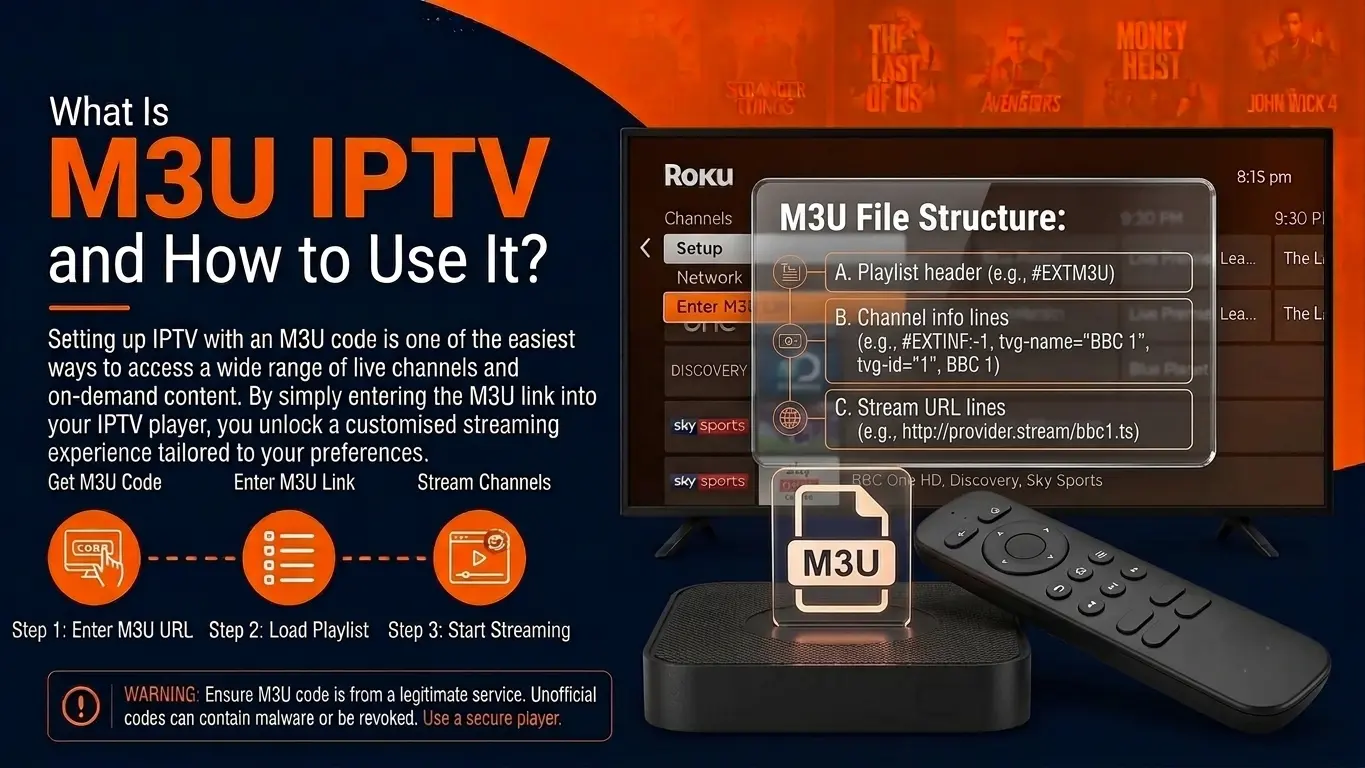
An M3U playlist is a plain-text file that lists streams. In IPTV, each entry gives a channel's name, logo, group and guide ID, followed by its stream URL, and a player app turns the file into a channel list. M3U8 is the same format saved in UTF-8.
On this page
M3U in one sentence
An M3U playlist is a text file (or a URL that returns one) listing streams one after another; an IPTV player reads it and turns it into a channel list. It started as a format for MP3 playlists and became the standard way to hand an IPTV channel list to any app.
What is inside an M3U file
Open one in a text editor and you see pairs of lines like this:
#EXTM3U
#EXTINF:-1 tvg-id="news.us" tvg-logo="https://…/logo.png" group-title="USA News",Example News HD
http://server.example:8080/user/pass/12345.ts| Part | Meaning |
|---|---|
#EXTM3U | First line: marks the file as an extended M3U playlist |
#EXTINF:-1 | Start of a channel entry; -1 means a live stream with no fixed length |
tvg-id | ID that links the channel to the EPG guide data |
tvg-logo | Address of the channel logo |
group-title | The category the channel appears in |
| Text after the comma | The channel name shown in the app |
| Next line | The stream URL the player opens |
M3U link vs Xtream Codes login
M3U link
- One long URL with your username and password inside
- Works in almost every player, including VLC
- Whole list downloads at once — can be slow
- EPG added separately with an XMLTV link
Xtream Codes (API)
- Server URL + username + password
- Supported by IPTV Smarters, TiviMate, XCIPTV and others
- Live, VOD and series load separately and faster
- EPG and catch-up come automatically
Which should you use?
If your app supports Xtream Codes, use it. Use the M3U link for players that only accept playlists (VLC, some Smart TV apps, Kodi's PVR client).
Which apps open M3U playlists
| Device | Apps that accept M3U |
|---|---|
| Firestick / Android TV | TiviMate, IPTV Smarters Pro, XCIPTV, Kodi (PVR IPTV Simple Client) |
| Samsung / LG TV | IBO Player, Hot IPTV, Smart IPTV, SS IPTV |
| iPhone / iPad / Apple TV | IPTV Smarters, GSE Smart IPTV, iPlayTV |
| Windows / Mac | VLC, IPTV Smarters desktop, Kodi |
Setup steps for each device are in our setup guides. To find or build your own link, read how to get your IPTV playlist URL.
Common M3U problems
- "Playlist could not be loaded" — the URL was mistyped, has a space, or the line has expired. Copy it again from your provider.
- Channels load but will not play — try the
.tsoutput instead of.m3u8(or the reverse) by changingoutput=in the link. - No TV guide — add the provider's EPG (XMLTV) URL in the app settings.
- List is huge and slow — switch to Xtream Codes login.
Where M3U8 fits in HLS
In adaptive streaming (HLS), .m3u8 files list small video segments rather than channels. When your app plays a channel in HLS mode, it quietly downloads a new .m3u8 every few seconds. Encoders that output HLS create these automatically — see streaming protocols.
Frequently asked questions
What is the difference between M3U and M3U8?
Same format; M3U8 is simply saved in UTF-8 text encoding, which handles channel names in any language. In HLS streaming, .m3u8 also names the small playlists that list video segments.
Is an M3U link the same as Xtream Codes?
They give access to the same channels in different ways. An M3U link is one URL containing the whole list. Xtream Codes is a login (server, username, password) that lets the app fetch channels, VOD, series and EPG separately — usually faster and better organised.
Why does my M3U playlist load slowly?
Large lists with thousands of channels and VOD entries can be tens of megabytes. Use Xtream Codes login if your app supports it, or ask your provider for a live-only M3U.
Can I edit an M3U file?
Yes, it is plain text. You can delete lines or rename groups in a text editor, but the channel URLs contain your login, so never share the file.